When you log in to Cloudpermit, you will see the navigation header in the top-right corner of the screen or application workspaces. From this header, you can take a variety of different actions, including:
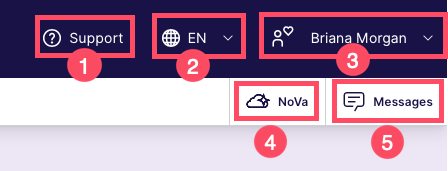
- Support: Access Cloudpermit Support.
- Language Selection: Change the language of the user interface.
- Username/Main Navigation Menu: Access your data in My Profile, customize your settings, and navigate to different parts of the platform.
- NoVa: Access NoVa, Cloudpermit’s AI-assisted chatbot.
- Messages: Access all messages across your workspaces.
Was this article helpful?
That’s Great!
Thank you for your feedback
Sorry! We couldn't be helpful
Thank you for your feedback
Feedback sent
We appreciate your effort and will try to fix the article