
Cloudpermit’s Laserfiche Integration connects seamlessly with Laserfiche ECM via the Laserfiche API's to create a corresponding Laserfiche folder with data and files from the Cloudpermit workspace.
Once the integration is setup in both Laserfiche Admin console and Cloudpermits Integration management and Admin configuration, staff will have the option to send the data and files from the Cloudpermit workspace to the Laserfiche repository with the SEND PACKAGE TO LASERFICHE button.
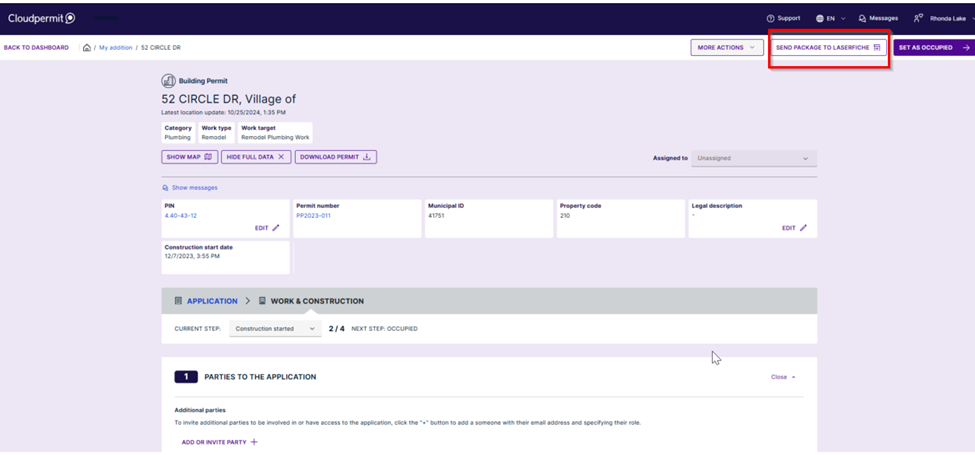
After selecting the SEND PACKAGE TO LASERFICHE button, the integration tools will generate the Package template and initiate the Laserfiche integration. If the integration is successful, the Cloudpermit screen will display a message confirming the Cloudpermit workspace data was successfully uploaded to Laserfiche. The Cloudpermit workspace will be updated updated with a tile indicating the Laserfiche sync times and the Laserfiche ID.
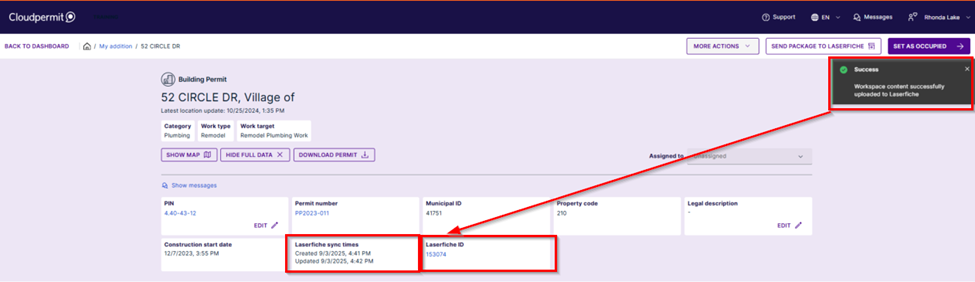
To access the Laserfiche folder through the Cloudpermit workspace, simply click the Laserfiche ID link to launch the content in the Laserfiche repository.