Only applicants and parties to whom the applicants have granted permission to modify can change the information of a party in the "Parties to the Application" section.
Furthermore, only applicants can remove parties from their applications. If a party is removed from one application, the individual can still work on another application, for example, in the supplemental application, to which the party has been invited.
Removing a Party Prior to Permit Issuance (Application Phase)
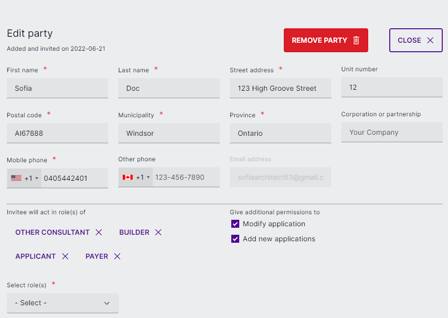
- Scroll to "Parties to the Application." Select the party card and click the blue pencil symbol on the card.

- Click "Remove Party."
- Confirm by clicking "Remove."
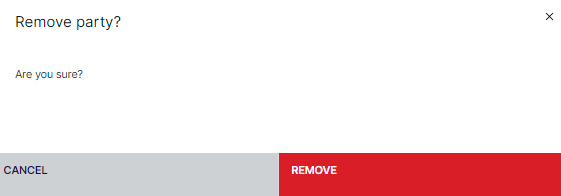
- The chosen party has been removed from the application, and the individual cannot access it.
Removing a Party Post-Issuance (Work/Construction Phase)
Post-issuance, all parties can be removed from the workspace and most roles can have their access revoked. To remove a party during this phase, take the following steps:
- Scroll to "Parties to the Application." Parties can be removed using the same process as above, but also display a checkbox with the option to revoke the user's workspace access.
- Note: The option to remove access is at an authority user's discretion. Even if the access is NOT removed, the party can only access application-phase details in a read-only view.
- Confirm by clicking "Remove."
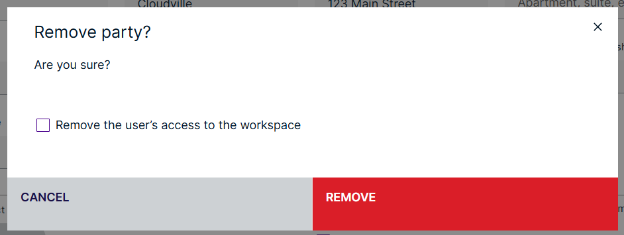
- The chosen party has been removed from the application, and the individual cannot access it.
Note: When removing an Applicant, Property Owner, or Agent, there is no option to remove their access to the workspace. They are primary parties that are considered sign-off roles and access cannot be removed entirely. They do not get a email saying that they have been removed since their access is not being revoked. If access needs to be removed entirely, the recommendation is to transfer or revoke the permit.
Was this article helpful?
That’s Great!
Thank you for your feedback
Sorry! We couldn't be helpful
Thank you for your feedback
Feedback sent
We appreciate your effort and will try to fix the article